> ## Documentation Index
> Fetch the complete documentation index at: https://docs.mailbreeze.com/llms.txt
> Use this file to discover all available pages before exploring further.
# Inbound Email
> Receive and process incoming emails through MailBreeze
Inbound Email allows your application to receive emails sent to your domain. When someone sends an email to `support@yourdomain.com`, MailBreeze captures it and delivers it to your application—via webhook, email forwarding, or the built-in inbox viewer.
## How It Works
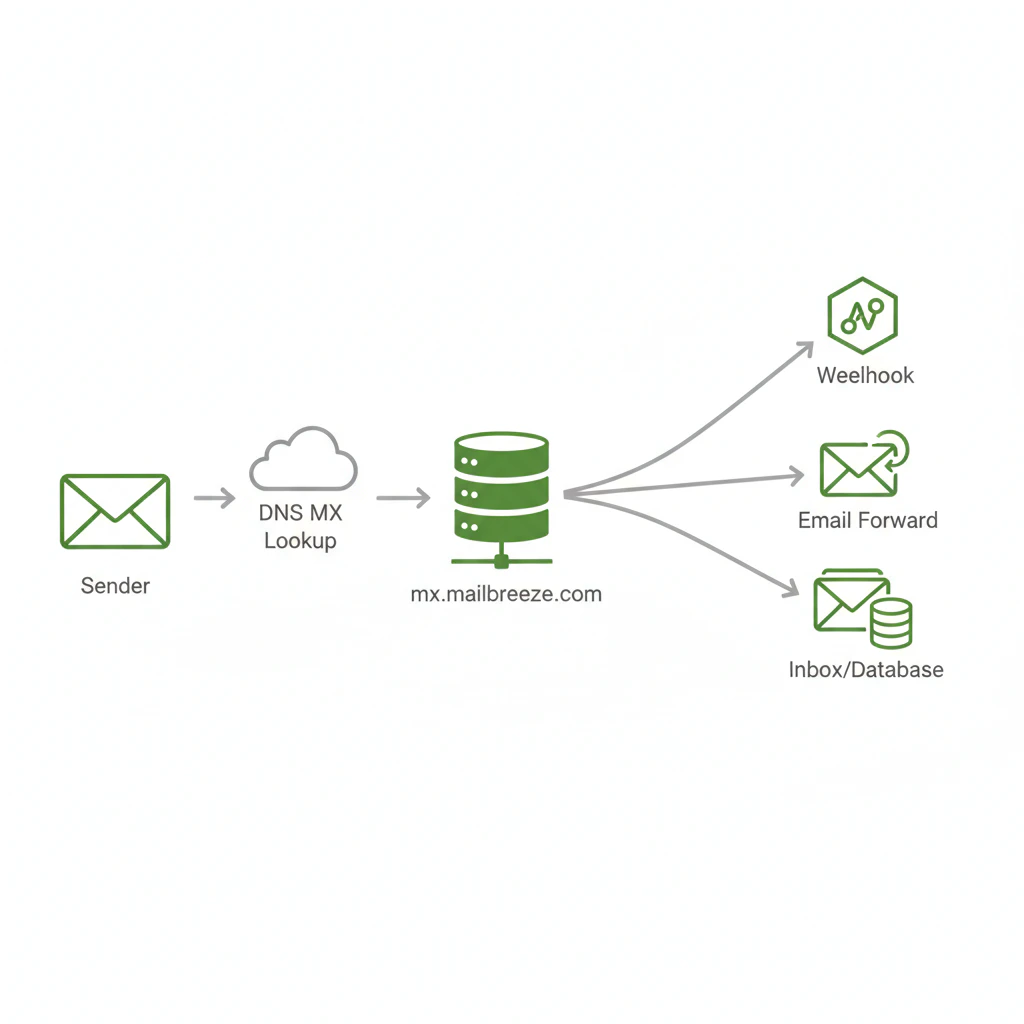
When you enable Inbound Email for a domain, MailBreeze becomes the mail exchanger (MX) for that domain:
1. Someone sends an email to `hello@yourdomain.com`
2. Their mail server looks up your domain's MX records
3. The MX record points to `mx.mailbreeze.com`
4. MailBreeze receives the email and processes it
5. Your application receives the email via your configured delivery method
 ## Use Cases
Route support emails to your helpdesk system via webhooks
Accept content submissions, form responses, or feedback via email
Extract data from incoming emails (invoices, receipts, notifications)
Capture replies to transactional emails you've sent
## Delivery Methods
When MailBreeze receives an inbound email, you choose how to handle it:
### Webhook Delivery
Send email data as a POST request to your server. This is ideal for applications that need to process emails programmatically—parsing content, extracting attachments, triggering workflows, or storing in a database.
```json Webhook Payload Example theme={null}
{
"id": "inb_a1b2c3d4e5f6",
"from": {
"address": "customer@example.com",
"name": "Jane Customer"
},
"to": [
{
"address": "support@yourdomain.com",
"name": null
}
],
"subject": "Question about my order",
"text": "Hi, I have a question about order #12345...",
"html": "
## Use Cases
Route support emails to your helpdesk system via webhooks
Accept content submissions, form responses, or feedback via email
Extract data from incoming emails (invoices, receipts, notifications)
Capture replies to transactional emails you've sent
## Delivery Methods
When MailBreeze receives an inbound email, you choose how to handle it:
### Webhook Delivery
Send email data as a POST request to your server. This is ideal for applications that need to process emails programmatically—parsing content, extracting attachments, triggering workflows, or storing in a database.
```json Webhook Payload Example theme={null}
{
"id": "inb_a1b2c3d4e5f6",
"from": {
"address": "customer@example.com",
"name": "Jane Customer"
},
"to": [
{
"address": "support@yourdomain.com",
"name": null
}
],
"subject": "Question about my order",
"text": "Hi, I have a question about order #12345...",
"html": "Hi, I have a question about order #12345...
",
"attachments": [
{
"filename": "receipt.pdf",
"contentType": "application/pdf",
"size": 45678,
"url": "https://api.mailbreeze.com/v1/inbound/inb_a1b2c3d4e5f6/attachments/att_xyz"
}
],
"headers": {
"message-id": "",
"date": "Mon, 27 Jan 2026 10:30:00 -0500"
},
"receivedAt": "2026-01-27T15:30:05.123Z"
}
```
Attachment URLs require authentication. Include your API key when downloading attachments. URLs expire after 7 days.
### Email Forwarding
Automatically forward incoming emails to one or more email addresses. This is useful when you want emails delivered to a team inbox (like a shared Gmail or Outlook mailbox) without building custom infrastructure.
You can forward to:
* Personal email addresses (e.g., `ceo@gmail.com`)
* Team inboxes (e.g., `team@company.slack.com`)
* Other ticketing systems that accept email (e.g., Zendesk, Freshdesk)
Forwarded emails come from MailBreeze's servers. Some receiving providers may flag forwarded emails differently. Consider using webhooks for critical workflows.
### MailBreeze Inbox (Local Storage)
Store emails directly in MailBreeze and view them in the dashboard. This is ideal for:
* Small teams that don't need external email clients
* Reviewing emails before setting up webhook processing
* Archiving incoming messages for compliance
Emails stored in the MailBreeze Inbox are:
* Searchable by sender, recipient, subject, and content
* Retained for 90 days (configurable on paid plans)
* Downloadable as `.eml` files
## Supported Features
| Feature | Description |
| ------------------- | --------------------------------------------------------------- |
| Multiple recipients | Handle emails sent to multiple addresses on your domain |
| CC/BCC capture | Receive full recipient information including CC fields |
| Attachments | Attachments up to 25MB per email, stored for 30 days |
| HTML and plain text | Both versions captured when available |
| Headers | Full email headers available for threading, spam analysis, etc. |
| SPF/DKIM/DMARC | Authentication results included in webhook payload |
| Spam filtering | Optional spam filtering with configurable thresholds |
## Limitations
* **One MX handler per domain**: Only MailBreeze can receive email for the domain. You cannot split email between MailBreeze and another provider (e.g., Google Workspace)
* **No mailbox storage**: MailBreeze is not a full email provider. Users cannot send emails from their inbound addresses
* **Webhook timeout**: Webhooks must respond within 30 seconds
* **Retention limits**: Emails in the MailBreeze Inbox are retained for 90 days by default
## Next Steps
Configure MX records and enable inbound email for your domain
Set up rules to route emails to different destinations
Process incoming emails in your application
Retrieve and manage inbound emails via API